server.js
const express = require("express")
const app = express() // 익스프레스를 객체로 만든것
const port = 8000 // 포트번호 정의
app.use(express.json()) //json을 인식해주도록 설정

app.get("/",(req,res)=>{
    res.sendFile(__dirname+"/index.html")
})

app.get("/loginPage",(req,res)=>{
    res.sendFile(__dirname+"/loginPage.html")
})

app.post("/login",(req,res)=>{ //id,pw
    //프론트 엔드로부터 받아온 값
    const idValue = req.body.id //..으로 구분해줌
    const pwValue = req.body.pw

    //프론트 엔드로부터 보내줄 값 , 중괄호 사이에 있는 것을 보내줌
    const result = {
        "success" : false
    }

    //로그인 체크 알고리즘
    if(idValue=="stageus" && pwValue=="1234"){
        result.success=true
    }

    // 프론트엔드에게 반환
    res.send(result)
})

app.listen(port, ()=>{
    console.log(`${port}번 포트에서 http 통신 시작`)
})
index.html
<!DOCTYPE html>
<html lang="kr">
<head>
<meta charset="UTF-8">
<meta http-equiv="X-UA-Compatible" content="IE=edge">
<meta name="viewport" content="width=device-width, initial-scale=1.0">
<title>Document</title>
</head>
<body>
<h1>스테이지어스 백엔드과정 페이지</h1>
<input type="button" value="로그인 페이지로" onclick="loginPageEvent()">
<script>
    const loginPageEvent=()=>{
    	location.href="/loginPage"
    }
</script>
</body>
</html>
location.href ⇒ 자체적으로 get 방식이다
location.href="/loginPage" ⇒ api이름을 적어줘야한다
ajax ⇒ 요청을 보내는 즉, 통신을 하는 기술
- 통신 (요청)을 보내는 기술
- 비동기 처리으로 동작함
동기 처리 vs 비동기 처리
동기 처리 ⇒ 윗줄의 있는 코드가 끝나기전까지 처리를 안해줌
비동기 처리 ⇒ 맨 윗줄의 코드가 비동기 처리이면 끝나는 것을 기다리지 않음, 화면에 먼저 html 그리고 5초 후 들어옴
유튜브 ⇒ 같은 경우 비동기, 먼저 화면을 띄우고 보여줌
fetch → ajax기능을 갖고 있음
사용하는 방법 : fetch(api이름, 객체- 데이터 집합)
객체 ⇒ json() key, value로 되어있음 ⇒ 데이터 순서 고려 필요가 없음
비동기 처리 해결하는 것
- 콜백
- promise
- async await
loginPage.html
1. promise 방법
<!DOCTYPE html>
<html lang="ko">
<head>
    <meta charset="UTF-8">
    <meta http-equiv="X-UA-Compatible" content="IE=edge">
    <meta name="viewport" content="width=device-width, initial-scale=1.0">
    <title>로그인 페이지</title>
</head>
<body>
    <input id ="idValue" type="text">
    <input id ="pwValue" type="text">
    <input type="button" value="로그인" onclick="loginEvent()">

    <script>
        const loginEvent = () => {
            // 보내기
            fetch("/login", {
                "method" : "POST", //요청하는 방법
                "headers" : {
                    "Content-Type" : "application/json" //내가 보내는 것은 json이다. 것들은 거의 고정들
                },
                "body" : JSON.stringify({
                    "id": document.getElementById("idValue").value, // 백엔드로 요청이 보내짐, 위에 id와 이름 정해진것
                    "pw": document.getElementById("pwValue").value,
                }) // 보내는 값 , json 타입은 문자로 바꿔서 보내줘야함 , 실제로 보내짐
            })
            .then((result)=>{
                return result.json() // 비동기 처리
            })
            .then((result)=>{ // 위에거 하고 이걸 해주라
                if(result.success == true){
                    alert("로그인성공")
                }else{
                    alert("로그인실패")
                }
            })
            // result = result.json //json으로 바꿔줌
            // console.log(result) // 비동기라서 위에 result에서 안받아온걸 가지고 출력하니깐 안됨, 비동기가 끝날때까지 기다려야한다.
        }
    </script>
</body>
</html>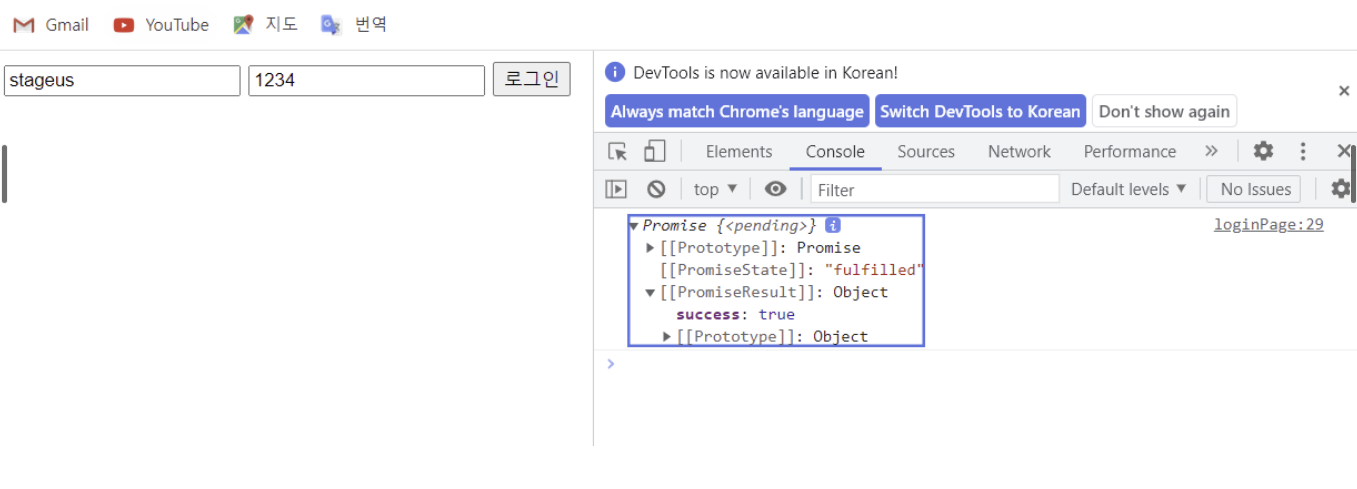
2. async await 방법
<!DOCTYPE html>
<html lang="ko">
<head>
    <meta charset="UTF-8">
    <meta http-equiv="X-UA-Compatible" content="IE=edge">
    <meta name="viewport" content="width=device-width, initial-scale=1.0">
    <title>로그인 페이지</title>
</head>
<body>
    <input id ="idValue" type="text">
    <input id ="pwValue" type="text">
    <input type="button" value="로그인" onclick="loginEvent2()">

    <script>
        const loginEvent2 = async () =>{ //async가 들어가 있는 것 안에는 비동기가 있다,
            const result = await fetch("/login", { //await
                "method" : "POST",
                "headers" : {
                    "Content-Type" : "application/json"
                },
                "body" : JSON.stringify({
                    "id": document.getElementById("idValue").value,
                    "pw": document.getElementById("pwValue").value,
                })
            })
            const data = await result.json() //await
            if(data.success == true){
                alert("로그인성공")
            }else{
                alert("로그인실패")
            }
        }
    </script>
</body>
</html>
728x90
'웹 > 백엔드 서버' 카테고리의 다른 글
| API 최적화 & API의 명세서 (0) | 2022.04.19 |
|---|---|
| node.js에 mariaDB로 게시판과 게시글페이지 만들기 (0) | 2022.04.18 |
| node.js와 mariaDB로 로그인, 회원가입 만들기 (0) | 2022.04.18 |
| PUTTY에서 Node.js설치 및 실행 방법 (0) | 2022.04.11 |
| Javascript Essential : ES6+ 문법 (0) | 2022.04.11 |


댓글