먼저 db연결과 로그인 회원가입까지는 아래 페이지에서 확인
https://joen00.tistory.com/104
node.js와 mariaDB로 로그인, 회원가입 만들기
mariaDB와 node.js까지 연결한 상태입니다. 연결 못했으면 npm으로 설치 후 만들면 됩니다. 1. db테이블 만들기 putty에 들어가서 mariadb에 접속한다. 아래와 같이 입력하여 database와 table을 만들고 내용을
joen00.tistory.com
1. server.js ==> 로그인, 회원가입, 게시판, 게시글, 게시글 작성까지 다 있다.
const express = require("express")
const app = express()
const port = 8000
const maria = require("./maria")

maria.connect();

app.set('view engine', 'ejs');
app.engine('html', require('ejs').renderFile);

app.use(express.json())
app.get("/",(req,res)=>{
    res.sendFile(__dirname+"/index.html")
})
app.get("/loginPage",(req,res)=>{
    res.sendFile(__dirname+"/loginPage.html")
})
app.get("/signupPage",(req,res)=>{
    res.sendFile(__dirname+"/signupPage.html")
})

app.get("/boardwritePage",(req,res)=>{
    res.sendFile(__dirname+"/boardwritePage.html")
})

app.get("/boardlistPage",(req,res)=>{
    maria.query('SELECT * FROM board', (err, rows)=>{
        if(err)throw err;
         res.render('../boardlistPage', {rows:rows});
    });
})

app.get("/boardPage/:id",(req,res)=>{
    const id=req.params.id;
    const sql= "select id, title, content from board where id=?";
    maria.query(sql,[id],(err,row)=>{
        if(err)throw err;
        res.render('../boardPage',{row:row[0]})
    })
})


app.post('/signup',(req,res)=>{
    const nameValue = req.body.name
    const pwValue = req.body.pw
    const sql_value={name:nameValue,pw:pwValue}
    const result = {
        "success" : false
    }
    maria.query('select name from user where name=?',[nameValue],(err,data)=>{
        if(data.length == 0){
            maria.query('insert into user set?',sql_value,(err,data)=>{
                if(err) {
                    throw err;
                }
                else{
                    result.success=true
                    console.log('회원가입 성공');
                    res.send(result)
                }
            });
        }else{
            console.log('회원가입 실패');
            res.send(result)
        }
    });
});

app.post("/login",(req,res)=>{
    const name = req.body.name
    const pw = req.body.pw
    const sql = `SELECT * FROM user WHERE name="${name}"`;
    const result = {
        "success" : false
    }
    maria.query(sql, (err,data)=>{
        if(data.length === 0){
            console.log('로그인 실패');
            res.send(result)
        }
        else if(data[0].pw !== pw){
            console.log('로그인 실패');
            res.send(result)
        }
        else {
            result.success=true;
            console.log(data[0].pw);
            console.log(data[0].name);
            console.log('로그인 성공');
            res.send(result);
        }
    });
})

app.post('/boardwrite',(req,res)=>{
    const title = req.body.title
    const content = req.body.content
    const sql_value={title:title,content:content}
    const result = {
        "success" : false
    }
    maria.query('select title from board where title=?',[title],(err,data)=>{
        if(data.length == 0){
            maria.query('insert into board set?',sql_value,(err,data)=>{
                if(err) {
                    throw err;
                }
                else{
                    result.success=true
                    console.log('게시글 업로드 성공');
                    res.send(result)
                }
            });
        }else{
            console.log('게시글 업로드 실패');
            res.send(result)
        }
    });
});

app.listen(port, ()=>{
    console.log(`${port}번 포트에서 http 통신 시작`)
})


// 확인용
// var params = ['hi', '1234'];//파라미터를 값들로 줌(배열로 생성)
// maria.query('INSERT INTO user (name, pw) VALUES(?, ?)', params, function(err, rows, fields){
//     if(err) console.log(err);
//     console.log(rows.insertId);
// });

// maria.query('SELECT * FROM board', (err, rows, fields)=>{
//     if(err){
//         console.log(err);
//     }
//     console.log(rows);
// });

// maria.end();
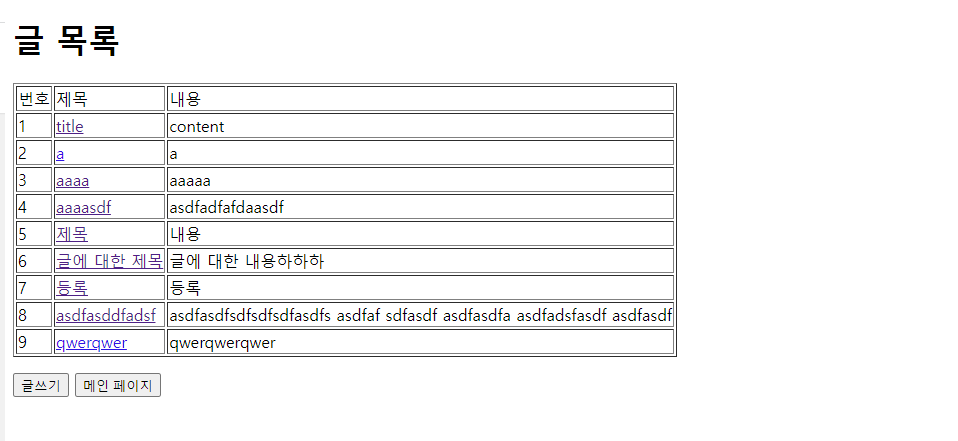
2. boardlistPage.ejs
<!DOCTYPE html>
<html lang="ko">
<head>
    <meta charset="UTF-8">
    <meta http-equiv="X-UA-Compatible" content="IE=edge">
    <meta name="viewport" content="width=device-width, initial-scale=1.0">
    <title>글 목록 페이지</title>
</head>
<body>
    <h1>글 목록</h1>
    <table border="1">
    <tr>
        <td>번호</td>
        <td>제목</td>
        <td>내용</td>
    </tr>
    <%
    for(var i=0; i<rows.length; i++)
    {
        var data = rows[i];
    %>
    <tr>
        <td><%=data.id%></td>
        <td><a href="/boardPage/<%=data.id%>"><%=data.title%></a></td>
        <td><%=data.content%></td>
    </tr>
    <%}%>
    </table>
    <p></p>
    <input type="button" value="글쓰기" onclick="boardwriteEvent()">
    <input type="button" value="메인 페이지" onclick="mainEvent()">
    <script>
        const boardwriteEvent=()=>{
            location.href="/boardwritePage"
        }
        const mainEvent=()=>{
            location.href="/"
        }
    </script>
</body>
</html>
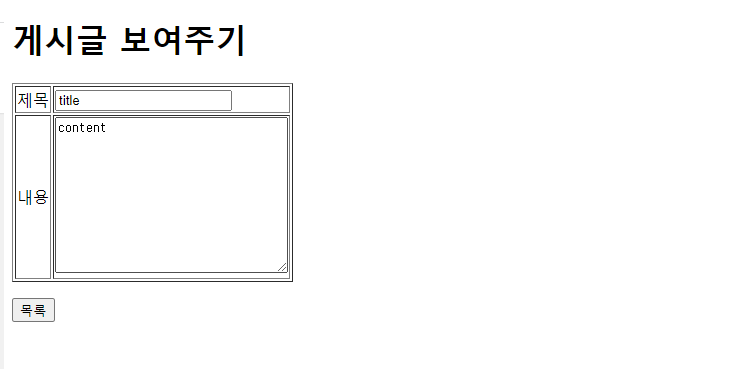
3. boardPage.ejs
<!DOCTYPE html>
<html lang="ko">
<head>
    <meta charset="UTF-8">
    <meta http-equiv="X-UA-Compatible" content="IE=edge">
    <meta name="viewport" content="width=device-width, initial-scale=1.0">
    <title>게시판 페이지</title>
</head>
<body>
    <h1>게시글 보여주기</h1>
    <table border="1">
        <input type="hidden" name="id" value="<%=row.id%>"/>
        <tr>
            <td>제목</td>
            <td><input type="text" name="title" id="title" value="<%=row.title%>" required/></td>
        </tr>
        <tr>
            <td>내용</td>
            <td><textarea name="content" id="content" cols="30" rows="10" required><%=row.content%></textarea></td>
        </tr>
    </table>
    <p></p>
    <input type="button" value="목록" onclick="boardEvent()">
    <script>
        const boardEvent=()=>{
            location.href="/boardlistPage"
        }
    </script>
</body>
</html>
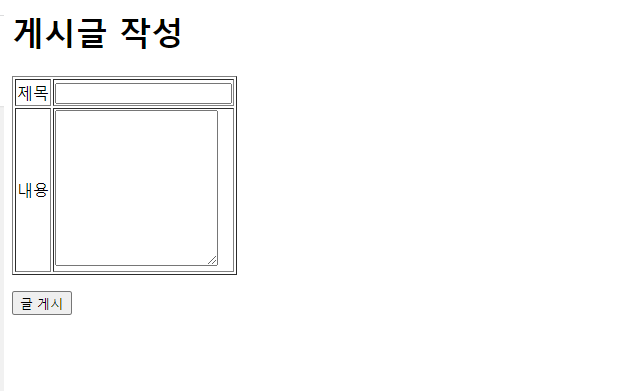
3. boardwritePage.html
<!DOCTYPE html>
<html lang="ko">
<head>
    <meta charset="UTF-8">
    <meta http-equiv="X-UA-Compatible" content="IE=edge">
    <meta name="viewport" content="width=device-width, initial-scale=1.0">
    <title>게시글 작성 페이지</title>
</head>
<body>
    <h1>게시글 작성</h1>
    <table border="1">
        <input type="hidden" name="id" value="<%=row.id%>"/>
        <tr>
            <td>제목</td>
            <td><input id ="title" type="text"></td>
        </tr>
        <tr>
            <td>내용</td>
            <td><textarea id ="content" rows="10"></textarea></td>
        </tr>
    </table>
    <p></p>
    <input type="button" value="글 게시" onclick="boardwriteEvent()">
    <script>
        const boardwriteEvent = async () =>{
            const result = await fetch("/boardwrite", {
                "method" : "POST",
                "headers" : {
                    "Content-Type" : "application/json"
                },
                "body" : JSON.stringify({
                    "title": document.getElementById("title").value,
                    "content": document.getElementById("content").value,
                })
            })
            const data = await result.json()
            if(data.success == true){
                alert("게시글 업로드 성공")
                document.location.href="/boardlistPage";
            }else{
                alert("게시글 업로드 실패")
            }
        }
    </script>
</body>
</html>
<완성본>
boardlistPage.html
boardPage.html
boardwritePage.html
728x90
'웹 > 백엔드 서버' 카테고리의 다른 글
| DNS ( Domain name system ) (0) | 2022.04.19 |
|---|---|
| API 최적화 & API의 명세서 (0) | 2022.04.19 |
| node.js와 mariaDB로 로그인, 회원가입 만들기 (0) | 2022.04.18 |
| node.js에서 로그인 페이지 (0) | 2022.04.11 |
| PUTTY에서 Node.js설치 및 실행 방법 (0) | 2022.04.11 |


댓글